👨??? 主頁: gis分享者
👨??? 感謝各位大佬 點贊👍 收藏? 留言📝 加關注?!
👨??? 收錄于專欄:threejs gis工程師
文章目錄
- 一、🍀前言
- 1.1 ??THREE.EffectComposer 后期處理
- 1.1.1 ??代碼示例
- 1.1.2 ??構造函數
- 1.1.3 ??屬性
- 1.1.4 ??方法
- 1.2 ??THREE.RenderPass
- 1.2.1 ??構造函數
- 1.2.2 ??屬性
- 1.2.3 ??方法
- 1.3 ??THREE.UnrealBloomPass
- 1.3.1 ??構造函數
- 1.3.2 ??方法
- 1.4 ??THREE.FilmPass
- 1.4.1 ??構造函數
- 1.4.2 ??屬性
- 1.4.3 ??方法
- 二、🍀使用EffectComposer后期處理組合器(采用RenderPass、UnrealBloomPass、FilmPass渲染通道),實現交互式 3D blob
- 1. ??實現思路
- 2. ??代碼樣例
一、🍀前言
本文詳細介紹如何基于threejs在三維場景中使用EffectComposer后期處理組合器(采用RenderPass、UnrealBloomPass、FilmPass渲染通道),實現交互式 3D blob,親測可用。希望能幫助到您。一起學習,加油!加油!
1.1 ??THREE.EffectComposer 后期處理
THREE.EffectComposer 用于在three.js中實現后期處理效果。該類管理了產生最終視覺效果的后期處理過程鏈。 后期處理過程根據它們添加/插入的順序來執行,最后一個過程會被自動渲染到屏幕上。
1.1.1 ??代碼示例
import { EffectComposer } from 'three/examples/jsm/postprocessing/EffectComposer.js';
import { RenderPass } from 'three/examples/jsm/postprocessing/RenderPass.js';
// 初始化 composer
const composer = new EffectComposer(renderer);
// 創建 RenderPass 并添加到 composer
const renderPass = new RenderPass(scene, camera);
composer.addPass(renderPass);
// 添加其他后期處理通道(如模糊)
// composer.addPass(blurPass);
// 在動畫循環中渲染
function animate() {composer.render();requestAnimationFrame(animate);
}
1.1.2 ??構造函數
EffectComposer( renderer : WebGLRenderer, renderTarget : WebGLRenderTarget )
renderer – 用于渲染場景的渲染器。
renderTarget – (可選)一個預先配置的渲染目標,內部由 EffectComposer 使用。
1.1.3 ??屬性
.passes : Array
一個用于表示后期處理過程鏈(包含順序)的數組。
渲染通道:
BloomPass   該通道會使得明亮區域參入較暗的區域。模擬相機照到過多亮光的情形
DotScreenPass   將一層黑點貼到代表原始圖片的屏幕上
FilmPass    通過掃描線和失真模擬電視屏幕
MaskPass    在當前圖片上貼一層掩膜,后續通道只會影響被貼的區域
RenderPass  該通道在指定的場景和相機的基礎上渲染出一個新的場景
SavePass    執行該通道時,它會將當前渲染步驟的結果復制一份,方便后面使用。這個通道實際應用中作用不大;
ShaderPass  使用該通道你可以傳入一個自定義的著色器,用來生成高級的、自定義的后期處理通道
TexturePass 該通道可以將效果組合器的當前狀態保存為一個紋理,然后可以在其他EffectCoposer對象中將該紋理作為輸入參數
.readBuffer : WebGLRenderTarget
內部讀緩沖區的引用。過程一般從該緩沖區讀取先前的渲染結果。
.renderer : WebGLRenderer
內部渲染器的引用。
.renderToScreen : Boolean
最終過程是否被渲染到屏幕(默認幀緩沖區)。
.writeBuffer : WebGLRenderTarget
內部寫緩沖區的引用。過程常將它們的渲染結果寫入該緩沖區。
1.1.4 ??方法
.addPass ( pass : Pass ) : undefined
pass – 將被添加到過程鏈的過程
將傳入的過程添加到過程鏈。
.dispose () : undefined
釋放此實例分配的 GPU 相關資源。每當您的應用程序不再使用此實例時調用此方法。
.insertPass ( pass : Pass, index : Integer ) : undefined
pass – 將被插入到過程鏈的過程。
index – 定義過程鏈中過程應插入的位置。
將傳入的過程插入到過程鏈中所給定的索引處。
.isLastEnabledPass ( passIndex : Integer ) : Boolean
passIndex – 被用于檢查的過程
如果給定索引的過程在過程鏈中是最后一個啟用的過程,則返回true。 由EffectComposer所使用,來決定哪一個過程應當被渲染到屏幕上。
.removePass ( pass : Pass ) : undefined
pass – 要從傳遞鏈中刪除的傳遞。
從傳遞鏈中刪除給定的傳遞。
.render ( deltaTime : Float ) : undefined
deltaTime – 增量時間值。
執行所有啟用的后期處理過程,來產生最終的幀,
.reset ( renderTarget : WebGLRenderTarget ) : undefined
renderTarget – (可選)一個預先配置的渲染目標,內部由 EffectComposer 使用。
重置所有EffectComposer的內部狀態。
.setPixelRatio ( pixelRatio : Float ) : undefined
pixelRatio – 設備像素比
設置設備的像素比。該值通常被用于HiDPI設備,以阻止模糊的輸出。 因此,該方法語義類似于WebGLRenderer.setPixelRatio()。
.setSize ( width : Integer, height : Integer ) : undefined
width – EffectComposer的寬度。
height – EffectComposer的高度。
考慮設備像素比,重新設置內部渲染緩沖和過程的大小為(width, height)。 因此,該方法語義類似于WebGLRenderer.setSize()。
.swapBuffers () : undefined
交換內部的讀/寫緩沖。
1.2 ??THREE.RenderPass
THREE.RenderPass用于將場景渲染到中間緩沖區,為后續的后期處理效果(如模糊、色調調整等)提供基礎。
1.2.1 ??構造函數
RenderPass(scene, camera, overrideMaterial, clearColor, clearAlpha)
- scene THREE.Scene 要渲染的 Three.js 場景對象。
- camera THREE.Camera 場景對應的相機(如 PerspectiveCamera)。
- overrideMaterial THREE.Material (可選) 覆蓋場景中所有物體的材質(默認 null)。
- clearColor THREE.Color (可選) 渲染前清除畫布的顏色(默認不主動清除)。
- clearAlpha number (可選) 清除畫布的透明度(默認 0)。
1.2.2 ??屬性
.enabled:boolean
是否啟用此通道(默認 true)。設為 false 可跳過渲染。
.clear:boolean
渲染前是否清除畫布(默認 true)。若需疊加多個 RenderPass,可設為 false。
.needsSwap:boolean
是否需要在渲染后交換緩沖區(通常保持默認 false)。
1.2.3 ??方法
.setSize(width, height)
調整通道的渲染尺寸(通常由 EffectComposer 自動調用)。
width: 畫布寬度(像素)。
height: 畫布高度(像素)。
1.3 ??THREE.UnrealBloomPass
UnrealBloomPass 是 Three.js 中實現高質量泛光效果的后期處理通道,通過模擬類似 Unreal Engine 的泛光效果,為場景中的明亮區域添加柔和的光暈,提升視覺表現力。
1.3.1 ??構造函數
new UnrealBloomPass(resolution, strength, radius, threshold)
- resolution (Vector2): 泛光效果應用的場景分辨率,需與畫布尺寸一致。
示例:new THREE.Vector2(window.innerWidth, window.innerHeight) - strength (Number): 泛光強度,默認值 1.0。值越大,光暈越明顯。
- radius (Number): 模糊半徑,默認值 0.4。值越大,光暈擴散范圍越廣。
- threshold (Number): 泛光閾值,默認值 0.85。僅對亮度高于此值的區域生效。
1.3.2 ??方法
- renderToScreen: 是否直接渲染到屏幕,默認為 false(需通過 EffectComposer 管理)。
- clearColor: 設置背景清除顏色,默認為透明。
1.4 ??THREE.FilmPass
THREE.FilmPass是 Three.js 后期處理模塊中的一個特效通道,用于模擬電影膠片效果(如掃描線、顆粒噪聲和畫面抖動)。適用于復古風格或科幻場景的視覺增強。
1.4.1 ??構造函數
FilmPass(
noiseIntensity, // 噪聲強度
scanlinesIntensity,// 掃描線強度
scanlinesCount, // 掃描線數量
grayscale // 是否轉為灰度
)
1.4.2 ??屬性
.enabled:boolean
是否啟用此通道(默認 true)。設為 false 可臨時禁用效果。
.uniforms:object
著色器 uniforms 對象,可直接修改參數(動態調整效果):
filmPass.uniforms.nIntensity.value = 0.8; // 調整噪聲強度
filmPass.uniforms.sIntensity.value = 0.5; // 調整掃描線強度
filmPass.uniforms.sCount.value = 1024;    // 調整掃描線密度
filmPass.uniforms.grayscale.value = 1;    // 啟用灰度(1 是,0 否)
1.4.3 ??方法
.setSize(width, height)
調整通道的渲染尺寸(通常由 EffectComposer 自動調用)。
width: 畫布寬度(像素)。
height: 畫布高度(像素)。
二、🍀使用EffectComposer后期處理組合器(采用RenderPass、UnrealBloomPass、FilmPass渲染通道),實現交互式 3D blob
1. ??實現思路
本例子使用EffectComposer后期處理組合器(采用RenderPass、UnrealBloomPass、FilmPass渲染通道)、THREE.Points點對象等,實現交互式 3D blob。具體代碼參考下面代碼樣例。
2. ??代碼樣例
<!DOCTYPE html>
<html lang="en">
<head><script src="https://cdn.tailwindcss.com"></script><link href="https://fonts.googleapis.com/css2?family=Inter:wght@300;400;500;600;700&display=swap" rel="stylesheet"><meta charset="UTF-8"><meta name="viewport" content="width=device-width, initial-scale=1.0"><title>交互式 3D blob</title><style>body {margin: 0;overflow: hidden;font-family: 'Inter', sans-serif;}canvas {display: block;width: 100vw;height: 100vh;}::-webkit-scrollbar {width: 8px;}::-webkit-scrollbar-track {background: rgba(255, 255, 255, 0.1);border-radius: 10px;}::-webkit-scrollbar-thumb {background: rgba(255, 255, 255, 0.3);border-radius: 10px;}::-webkit-scrollbar-thumb:hover {background: rgba(255, 255, 255, 0.5);}select {background-image: url("data:image/svg+xml;charset=US-ASCII,%3Csvg%20xmlns%3D%22http%3A%2F%2Fwww.w3.org%2F2000%2Fsvg%22%20width%3D%22292.4%22%20height%3D%22292.4%22%3E%3Cpath%20fill%3D%22%23DDDDDD%22%20d%3D%22M287%2069.4a17.6%2017.6%200%200%200-13-5.4H18.4c-5%200-9.3%201.8-12.9%205.4A17.6%2017.6%200%200%200%200%2082.2c0%205%201.8%209.3%205.4%2012.9l128%20127.9c3.6%203.6%207.8%205.4%2012.8%205.4s9.2-1.8%2012.8-5.4L287%2095c3.5-3.5%205.4-7.8%205.4-12.8%200-5-1.9-9.2-5.5-12.8z%22%2F%3E%3C%2Fsvg%3E");background-repeat: no-repeat;background-position: right 0.75rem top 50%;background-size: 0.65em auto;-webkit-appearance: none;-moz-appearance: none;appearance: none;}</style>
</head>
<body>
<div id="ui-container" class="fixed top-5 right-5 z-50 bg-gray-900/70 backdrop-blur-md p-6 rounded-xl shadow-2xl border border-gray-700/50 transition-all duration-300 ease-in-out w-72"><h3 class="text-lg font-semibold text-gray-100 mb-5 tracking-wide uppercase">Dithering Controls</h3><div class="mb-5"><label for="dither-pattern" class="block text-sm font-medium text-gray-300 mb-2">Dither Pattern</label><select id="dither-pattern" class="w-full bg-gray-800/80 border border-gray-700 text-gray-200 text-sm rounded-lg focus:ring-indigo-500 focus:border-indigo-500 block p-2.5 placeholder-gray-400 shadow-sm appearance-none"><option value="0">Bayer Matrix (8x8)</option><option value="1">Halftone Dots</option><option value="2">Line Pattern</option><option value="3">Noise Dithering</option><option value="4">No Dithering</option></select></div><div class="mb-3"><label for="dither-scale" class="block text-sm font-medium text-gray-300 mb-2">Dither Scale</label><select id="dither-scale" class="w-full bg-gray-800/80 border border-gray-700 text-gray-200 text-sm rounded-lg focus:ring-indigo-500 focus:border-indigo-500 block p-2.5 placeholder-gray-400 shadow-sm appearance-none"><option value="1.0">Fine</option><option value="1.5" selected>Medium</option><option value="2.5">Coarse</option><option value="3.5">Very Coarse</option></select></div>
</div>
</body>
<script type="module">import * as THREE from "https://esm.sh/three";import { OrbitControls } from "https://esm.sh/three/examples/jsm/controls/OrbitControls.js";import { EffectComposer } from "https://esm.sh/three/examples/jsm/postprocessing/EffectComposer.js";import { RenderPass } from "https://esm.sh/three/examples/jsm/postprocessing/RenderPass.js";import { UnrealBloomPass } from "https://esm.sh/three/examples/jsm/postprocessing/UnrealBloomPass.js";import { FilmPass } from "https://esm.sh/three/examples/jsm/postprocessing/FilmPass.js";const DITHER_MOTION_SPEED = 2.0;const DITHER_MOTION_AMPLITUDE = 1.5;const BLOB_BASE_RADIUS = 2.0;const BLOB_NOISE_FREQUENCY_VERTEX = 0.75;const BLOB_NOISE_AMPLITUDE_VERTEX = 0.65;const BLOB_NOISE_SPEED_VERTEX = 0.08;const PARTICLE_COUNT = 1200;const STAR_COUNT = 3000;const scene = new THREE.Scene();scene.background = new THREE.Color(0x000000);scene.fog = new THREE.FogExp2(0x000000, 0.025);const camera = new THREE.PerspectiveCamera(75, window.innerWidth / window.innerHeight, 0.1, 1000);camera.position.set(0, 0, 5.0);const renderer = new THREE.WebGLRenderer({ antialias: true, powerPreference: "high-performance" });renderer.setSize(window.innerWidth, window.innerHeight);renderer.setPixelRatio(Math.min(window.devicePixelRatio, 1.5));renderer.outputColorSpace = THREE.SRGBColorSpace;document.body.appendChild(renderer.domElement);const composer = new EffectComposer(renderer);const renderPass = new RenderPass(scene, camera);composer.addPass(renderPass);const bloomPass = new UnrealBloomPass(new THREE.Vector2(window.innerWidth, window.innerHeight), 0.45, 0.55, 0.75);composer.addPass(bloomPass);const filmPass = new FilmPass(0.20, 0.15, 648, false);composer.addPass(filmPass);const controls = new OrbitControls(camera, renderer.domElement);controls.enableDamping = true;controls.dampingFactor = 0.04;controls.rotateSpeed = 0.20;controls.minDistance = 2.0;controls.maxDistance = 12;controls.enablePan = false;controls.autoRotate = false;const ambientLight = new THREE.AmbientLight(0x606070, 0.6);scene.add(ambientLight);const pointLight1 = new THREE.PointLight(0xffddaa, 0.9, 60);pointLight1.position.set(5, 5, 5);scene.add(pointLight1);const pointLight2 = new THREE.PointLight(0xaaccff, 0.6, 60);pointLight2.position.set(-5, -3, -4);scene.add(pointLight2);const pointLight3 = new THREE.PointLight(0xff8844, 0.75, 60);pointLight3.position.set(0, -5, 3);scene.add(pointLight3);const starGeometry = new THREE.BufferGeometry();const starPositions = [];const starColors = [];const starSizes = [];for (let i = 0; i < STAR_COUNT; i++) {const x = THREE.MathUtils.randFloatSpread(200);const y = THREE.MathUtils.randFloatSpread(200);const z = THREE.MathUtils.randFloatSpread(200);starPositions.push(x, y, z);const color = new THREE.Color();color.setHSL(THREE.MathUtils.randFloat(0.5, 0.7), 0.2, THREE.MathUtils.randFloat(0.3, 0.6));starColors.push(color.r, color.g, color.b);starSizes.push(THREE.MathUtils.randFloat(0.5, 1.5));}starGeometry.setAttribute('position', new THREE.Float32BufferAttribute(starPositions, 3));starGeometry.setAttribute('color', new THREE.Float32BufferAttribute(starColors, 3));starGeometry.setAttribute('size', new THREE.Float32BufferAttribute(starSizes, 1));const starMaterial = new THREE.ShaderMaterial({uniforms: {uTime: { value: 0.0 },},vertexShader: `uniform float uTime;attribute float size;varying vec3 vColor;varying float vAlpha;void main() {vColor = color;vec4 mvPosition = modelViewMatrix * vec4(position, 1.0);gl_PointSize = size * (100.0 / -mvPosition.z) * (sin(position.x * 0.1 + uTime * 0.3) * 0.2 + 0.8);vAlpha = clamp(1.0 - (-mvPosition.z / 150.0), 0.1, 0.8);gl_Position = projectionMatrix * mvPosition;}`,fragmentShader: `uniform float uTime;varying vec3 vColor;varying float vAlpha;void main() {float dist = length(gl_PointCoord - vec2(0.5));if (dist > 0.5) discard;gl_FragColor = vec4(vColor, vAlpha * (0.6 + 0.4 * sin(uTime * 2.0 + gl_FragCoord.x * 0.5)));}`,transparent: true,blending: THREE.AdditiveBlending,depthWrite: false,vertexColors: true});const stars = new THREE.Points(starGeometry, starMaterial);scene.add(stars);const ditherPatternsFunction = `const float bayerMatrix[64] = float[64](0.0/64.0, 32.0/64.0,  8.0/64.0, 40.0/64.0,  2.0/64.0, 34.0/64.0, 10.0/64.0, 42.0/64.0,48.0/64.0, 16.0/64.0, 56.0/64.0, 24.0/64.0, 50.0/64.0, 18.0/64.0, 58.0/64.0, 26.0/64.0,12.0/64.0, 44.0/64.0,  4.0/64.0, 36.0/64.0, 14.0/64.0, 46.0/64.0,  6.0/64.0, 38.0/64.0,60.0/64.0, 28.0/64.0, 52.0/64.0, 20.0/64.0, 62.0/64.0, 30.0/64.0, 54.0/64.0, 22.0/64.0,3.0/64.0, 35.0/64.0, 11.0/64.0, 43.0/64.0,  1.0/64.0, 33.0/64.0,  9.0/64.0, 41.0/64.0,51.0/64.0, 19.0/64.0, 59.0/64.0, 27.0/64.0, 49.0/64.0, 17.0/64.0, 57.0/64.0, 25.0/64.0,15.0/64.0, 47.0/64.0,  7.0/64.0, 39.0/64.0, 13.0/64.0, 45.0/64.0,  5.0/64.0, 37.0/64.0,63.0/64.0, 31.0/64.0, 55.0/64.0, 23.0/64.0, 61.0/64.0, 29.0/64.0, 53.0/64.0, 21.0/64.0);float getBayerValue(vec2 coord) {int x = int(mod(coord.x, 8.0));int y = int(mod(coord.y, 8.0));return bayerMatrix[y * 8 + x];}float getHalftoneValue(vec2 coord, float time) {vec2 c = vec2(0.5);coord = mod(coord * 0.1 + vec2(sin(time*0.1)*0.02, cos(time*0.1)*0.02), 1.0);float d = distance(coord, c);return smoothstep(0.28, 0.29, d);}float getLinePatternValue(vec2 coord, float time) {float lw = 0.35 + sin(time*0.15)*0.1;float p1 = mod(coord.x*0.15+sin(coord.y*0.04+time*0.08)*0.6,1.0);float p2 = mod(coord.y*0.15+cos(coord.x*0.04+time*0.12)*0.6,1.0);return max(smoothstep(0.0,lw,p1)*smoothstep(1.0,1.0-lw,p1), smoothstep(0.0,lw,p2)*smoothstep(1.0,1.0-lw,p2));}float getNoiseDitheringValue(vec2 coord, float time) {return fract(sin(dot(coord + time * 0.05, vec2(12.9898, 78.233))) * 43758.5453);}vec3 ditherMonochrome(vec3 color, vec2 baseScreenPos, float colorLevels, float time,float motionSpeed, float motionAmplitude, int patternType) {float luminance = dot(color, vec3(0.299, 0.587, 0.114));luminance = pow(luminance, 1.2);luminance = (luminance - 0.5) * 6.0 + 0.5;luminance = clamp(luminance, 0.0, 1.0);vec2 ditherScreenPos = baseScreenPos;ditherScreenPos.x += sin(time * motionSpeed * 0.75 + baseScreenPos.y * 0.08) * motionAmplitude;ditherScreenPos.y += cos(time * motionSpeed * 0.55 + baseScreenPos.x * 0.08) * motionAmplitude;float threshold = 0.5;if (patternType == 0) {threshold = getBayerValue(ditherScreenPos);} else if (patternType == 1) {threshold = getHalftoneValue(ditherScreenPos, time);} else if (patternType == 2) {threshold = getLinePatternValue(ditherScreenPos, time);} else if (patternType == 3) {threshold = getNoiseDitheringValue(ditherScreenPos, time);} else if (patternType == 4) {threshold = 0.5;}float ditheredValue = (luminance < threshold) ? 0.0 : 1.0;return vec3(ditheredValue);}
`;const glslRandFunction = `float rand(vec3 co){ return fract(sin(dot(co, vec3(12.9898,78.233,53.543))) * 43758.5453); }float snoise(vec3 p) {vec3 ip = floor(p); vec3 fp = fract(p); fp = fp*fp*(3.0-2.0*fp);float v000=rand(ip+vec3(0,0,0)); float v100=rand(ip+vec3(1,0,0)); float v010=rand(ip+vec3(0,1,0)); float v110=rand(ip+vec3(1,1,0));float v001=rand(ip+vec3(0,0,1)); float v101=rand(ip+vec3(1,0,1)); float v011=rand(ip+vec3(0,1,1)); float v111=rand(ip+vec3(1,1,1));return mix(mix(mix(v000,v100,fp.x),mix(v010,v110,fp.x),fp.y), mix(mix(v001,v101,fp.x),mix(v011,v111,fp.x),fp.y),fp.z);}
`;const blobMaterial = new THREE.ShaderMaterial({uniforms: {uTime: { value: 0 },ditherScale: { value: 1.5 },colorLevels: { value: 2.0 },uDitherMotionSpeed: { value: DITHER_MOTION_SPEED },uDitherMotionAmplitude: { value: DITHER_MOTION_AMPLITUDE },uBaseColor: { value: new THREE.Color(0xffffff) },uFresnelPower: { value: 2.5 },uVertexNoiseFrequency: { value: BLOB_NOISE_FREQUENCY_VERTEX },uVertexNoiseAmplitude: { value: BLOB_NOISE_AMPLITUDE_VERTEX },uVertexNoiseSpeed: { value: BLOB_NOISE_SPEED_VERTEX },uSurfaceNoiseFrequency: { value: 2.8 },uSurfaceNoiseAmplitude: { value: 0.22 },uDitherPattern: { value: 0 },uCoreBrightness: { value: 0.2 }},vertexShader: `uniform float uTime;uniform float uVertexNoiseFrequency;uniform float uVertexNoiseAmplitude;uniform float uVertexNoiseSpeed;varying vec3 vNormal;varying vec3 vViewPosition;varying vec3 vWorldPosition;${glslRandFunction}void main() {vec3 pos = position;float displacement = snoise(pos * uVertexNoiseFrequency + uTime * uVertexNoiseSpeed) * uVertexNoiseAmplitude;displacement += snoise(pos * uVertexNoiseFrequency * 2.2 + uTime * uVertexNoiseSpeed * 1.4) * (uVertexNoiseAmplitude * 0.45);pos += normal * displacement;vec3 offset = vec3(0.01, 0.01, 0.01);float ddx_noise_orig = snoise((position + offset.xyy) * uVertexNoiseFrequency + uTime * uVertexNoiseSpeed) * uVertexNoiseAmplitude;ddx_noise_orig += snoise((position + offset.xyy) * uVertexNoiseFrequency * 2.2 + uTime * uVertexNoiseSpeed * 1.4) * (uVertexNoiseAmplitude * 0.45);vec3 p_ddx = (position + offset.xyy) + normal * ddx_noise_orig;float ddy_noise_orig = snoise((position + offset.yxy) * uVertexNoiseFrequency + uTime * uVertexNoiseSpeed) * uVertexNoiseAmplitude;ddy_noise_orig += snoise((position + offset.yxy) * uVertexNoiseFrequency * 2.2 + uTime * uVertexNoiseSpeed * 1.4) * (uVertexNoiseAmplitude * 0.45);vec3 p_ddy = (position + offset.yxy) + normal * ddy_noise_orig;vec3 tangent = normalize(p_ddx - pos);vec3 bitangent = normalize(p_ddy - pos);vec3 displacedNormal = normalize(cross(tangent, bitangent));if (length(displacedNormal) < 0.1) { displacedNormal = normal; }vNormal = normalize(normalMatrix * displacedNormal);vec4 mvPosition = modelViewMatrix * vec4(pos, 1.0);vViewPosition = -mvPosition.xyz;vWorldPosition = (modelMatrix * vec4(pos, 1.0)).xyz;gl_Position = projectionMatrix * mvPosition;}`,fragmentShader: `uniform float uTime;uniform float ditherScale;uniform float colorLevels;uniform float uDitherMotionSpeed;uniform float uDitherMotionAmplitude;uniform vec3 uBaseColor;uniform float uFresnelPower;uniform float uSurfaceNoiseFrequency;uniform float uSurfaceNoiseAmplitude;uniform int uDitherPattern;uniform float uCoreBrightness;varying vec3 vNormal;varying vec3 vViewPosition;varying vec3 vWorldPosition;${ditherPatternsFunction}${glslRandFunction}void main() {vec3 normal = normalize(vNormal);vec3 viewDir = normalize(vViewPosition);float fresnel = pow(1.0 - abs(dot(viewDir, normal)), uFresnelPower);fresnel = smoothstep(0.0, 1.0, fresnel) * 0.6 + 0.4;float rim = pow(1.0 - abs(dot(viewDir, normal)), 10.0);fresnel += rim * 0.25;float surfaceNoise1 = snoise(vWorldPosition * uSurfaceNoiseFrequency + vec3(uTime * 0.1, uTime * 0.06, uTime * 0.08));float surfaceNoise2 = snoise(vWorldPosition * uSurfaceNoiseFrequency * 2.7 + vec3(uTime * 0.15, uTime * 0.1, uTime * -0.04)) * 0.45;float surfaceNoise = (surfaceNoise1 + surfaceNoise2) * 0.5 + 0.5;surfaceNoise = surfaceNoise * uSurfaceNoiseAmplitude + (1.0 - uSurfaceNoiseAmplitude * 0.6);float coreGlow = pow(max(0.0, dot(viewDir, normal)), 2.0) * uCoreBrightness;float intensity = (fresnel + coreGlow) * surfaceNoise;intensity = clamp(intensity, 0.02, 1.0);vec3 finalColor = uBaseColor * intensity;vec2 screenPos = gl_FragCoord.xy / ditherScale;vec3 ditheredOutput = ditherMonochrome(finalColor, screenPos, colorLevels, uTime, uDitherMotionSpeed, uDitherMotionAmplitude, uDitherPattern);gl_FragColor = vec4(ditheredOutput, 1.0);}`,});const blobGeometry = new THREE.SphereGeometry(BLOB_BASE_RADIUS, 128, 128);const morphingBlob = new THREE.Mesh(blobGeometry, blobMaterial);scene.add(morphingBlob);const particleGeometry = new THREE.BufferGeometry();const particlePositions = new Float32Array(PARTICLE_COUNT * 3);const particleSizes = new Float32Array(PARTICLE_COUNT);const particleSpeeds = new Float32Array(PARTICLE_COUNT);for (let i = 0; i < PARTICLE_COUNT; i++) {const radius = BLOB_BASE_RADIUS * 2.5 + Math.random() * BLOB_BASE_RADIUS * 4;const theta = Math.random() * Math.PI * 2;const phi = Math.acos(2 * Math.random() - 1);particlePositions[i * 3] = radius * Math.sin(phi) * Math.cos(theta);particlePositions[i * 3 + 1] = radius * Math.sin(phi) * Math.sin(theta);particlePositions[i * 3 + 2] = radius * Math.cos(phi);particleSizes[i] = Math.random() * 0.06 + 0.015;particleSpeeds[i] = Math.random() * 0.2 + 0.1;}particleGeometry.setAttribute('position', new THREE.BufferAttribute(particlePositions, 3));particleGeometry.setAttribute('size', new THREE.BufferAttribute(particleSizes, 1));particleGeometry.setAttribute('speed', new THREE.BufferAttribute(particleSpeeds, 1));const particleMaterial = new THREE.ShaderMaterial({uniforms: {uTime: { value: 0 },uColor: { value: new THREE.Color(0xddddff) },uBlobBaseRadius: { value: BLOB_BASE_RADIUS }},vertexShader: `uniform float uTime;uniform float uBlobBaseRadius;attribute float size;attribute float speed;varying float vDistance;varying float vParticleAlpha;void main() {vec3 pos = position;float waveX = sin(uTime * (speed * 0.8) + position.y * 0.15) * 0.12;float waveY = cos(uTime * (speed * 1.0) + position.z * 0.20) * 0.12;float waveZ = sin(uTime * (speed * 0.9) + position.x * 0.18) * 0.12;pos += vec3(waveX, waveY, waveZ);vec4 mvPosition = modelViewMatrix * vec4(pos, 1.0);vDistance = length(mvPosition.xyz);gl_PointSize = size * (400.0 / -mvPosition.z);vParticleAlpha = smoothstep(uBlobBaseRadius * 6.0, uBlobBaseRadius * 2.0, vDistance);gl_Position = projectionMatrix * mvPosition;}`,fragmentShader: `uniform float uTime;uniform vec3 uColor;varying float vDistance;varying float vParticleAlpha;void main() {float dist = length(gl_PointCoord - vec2(0.5));if (dist > 0.5) discard;float pulse = 0.4 + 0.6 * abs(sin(uTime * (1.0 + mod(vDistance, 1.0) * 0.5) + vDistance * 0.2));float finalAlpha = (1.0 - dist * 2.0) * pulse * vParticleAlpha;finalAlpha = clamp(finalAlpha, 0.0, 0.5);gl_FragColor = vec4(uColor, finalAlpha * 0.4);}`,transparent: true,blending: THREE.AdditiveBlending,depthWrite: false});const particleSystem = new THREE.Points(particleGeometry, particleMaterial);scene.add(particleSystem);const ditherPatternSelect = document.getElementById('dither-pattern');const ditherScaleSelect = document.getElementById('dither-scale');const uiContainer = document.getElementById('ui-container');ditherPatternSelect.addEventListener('change', (e) => {blobMaterial.uniforms.uDitherPattern.value = parseInt(e.target.value);});ditherScaleSelect.addEventListener('change', (e) => {blobMaterial.uniforms.ditherScale.value = parseFloat(e.target.value);});let uiTimeout;const uiAutoHideDelay = 3000;const resetUITimeout = () => {clearTimeout(uiTimeout);uiContainer.classList.remove('opacity-0', 'translate-x-12');uiContainer.classList.add('opacity-100', 'translate-x-0');uiTimeout = setTimeout(() => {uiContainer.classList.remove('opacity-100', 'translate-x-0');uiContainer.classList.add('opacity-0', 'translate-x-12');}, uiAutoHideDelay);};document.addEventListener('mousemove', resetUITimeout);document.addEventListener('click', resetUITimeout);document.addEventListener('touchstart', resetUITimeout);resetUITimeout();window.addEventListener('resize', () => {camera.aspect = window.innerWidth / window.innerHeight;camera.updateProjectionMatrix();renderer.setSize(window.innerWidth, window.innerHeight);composer.setSize(window.innerWidth, window.innerHeight);renderer.setPixelRatio(Math.min(window.devicePixelRatio, 1.5));bloomPass.resolution.set(window.innerWidth, window.innerHeight);});camera.lookAt(scene.position);const clock = new THREE.Clock();function animate() {requestAnimationFrame(animate);const elapsedTime = clock.getElapsedTime();blobMaterial.uniforms.uTime.value = elapsedTime;particleMaterial.uniforms.uTime.value = elapsedTime;starMaterial.uniforms.uTime.value = elapsedTime;morphingBlob.rotation.x += 0.0004;morphingBlob.rotation.y += 0.0007;pointLight1.position.x = Math.sin(elapsedTime * 0.32) * 6;pointLight1.position.z = Math.cos(elapsedTime * 0.32) * 6;pointLight2.position.y = Math.sin(elapsedTime * 0.18) * 4;pointLight2.position.x = Math.cos(elapsedTime * 0.25) * -5;pointLight3.position.z = Math.cos(elapsedTime * 0.40) * 5;pointLight3.position.y = Math.sin(elapsedTime * 0.35) * -4;controls.update();composer.render();}window.onload = () => {animate();};
</script>
</html>
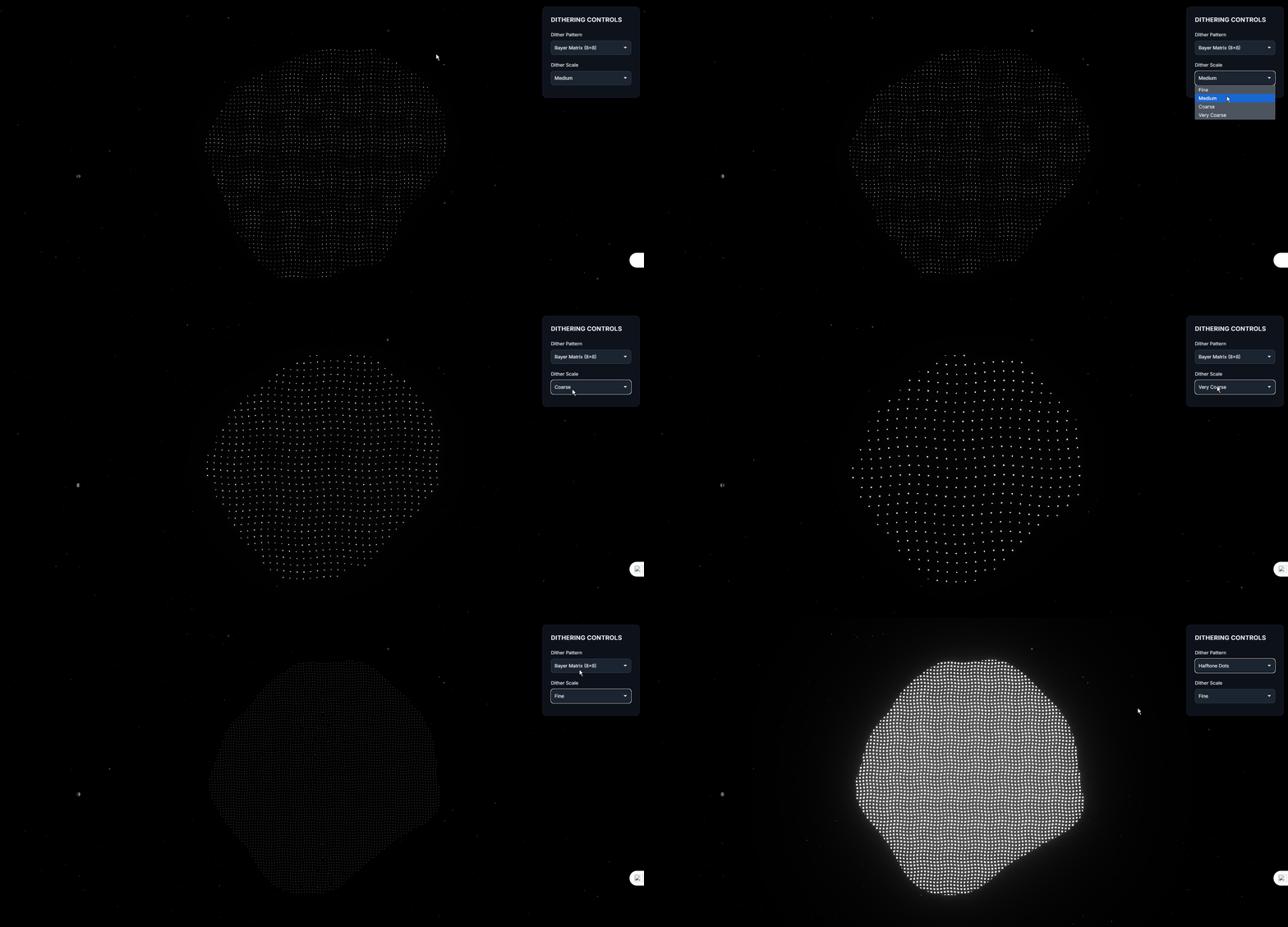
效果如下
)
)


:脫圍機制二)
)


![論文閱讀 2025-8-9 [DiC, DropKey]](http://pic.xiahunao.cn/論文閱讀 2025-8-9 [DiC, DropKey])


