框架太“重”了:通常一個小型項目只由少數幾個簡單頁面構成,如果使用 Vue 或者 React 這些框架來研發的話,有點“大材小用”了。構建的產物中包含了不少框架運行時代碼(虛擬 DOM、響應式、狀態管理等),這些代碼對于小型項目而言是冗余的,它們影響了包體大小,進而影響頁面的啟動速度和執行性能。
打包太慢了:以 Vue CLI 為例,它的底層基于 Webpack,雖然 Webpack 具備更強大的功能和靈活性,但相比于 Vite、Esbuild 這些以速度為標桿的構建工具來說,它的速度確實慢了一些,影響了研發效率。
文章目錄
- 一、 創建基本項目
- 1.1 全局安裝 Vite
- 1.2 創建 Svelte 項目
- 二、目錄結構
- 三、svelte路由配置
- 3.1 npm安裝
- 3.2 定義router
- 3.2.1 動態導入組件
- 3.2.2 在頁面之間導航
- 3.3 使用路由
- 四、svelte CSS預處理器
- 4.1 less的使用
- 4.1.1 npm安裝
- 4.2 Tailwind CSS的使用
- 五、svelte環境變量配置
- 5.1 環境變量命名規則
- 5.2 .env文件的使用
- 5.3 在代碼中使用環境變量
- 5.4 配置運行與打包環境
- 六、svelte國際化
- 6.1 安裝 `svelte-i18n`
- 6.2 初始化 `svelte-i18n`
- 6.3 創建語言文件
- 6.4 在 Svelte 組件中使用 `svelte-i18n`
- 6.5 切換語言
- 6.6 在 `App.svelte` 中引入 `i18n.js`
- 6.7 運行項目
- 6.8 構建項目
- 6.9 預覽項目
- 6.10 檢查項目
- 七、svelte接口請求
- 7.1 安裝 `axios`
- 7.2 創建 `axios` 實例
- 7.3 在 Svelte 組件中使用 `axios`
- 7.4 處理請求和響應攔截器
- 7.5 在 `App.svelte` 中使用 `axios`
- 7.6 處理錯誤
- 八、svelte組件庫
- 九、svelte阿里圖標庫
- 9.1 獲取阿里圖標
- 9.2 將圖標文件放入項目
- 9.3 引入圖標文件
- 9.4 使用圖標
- 9.5 動態切換圖標
- 9.6 使用 Symbol 方式(可選)
- 9.7 樣式調整(可選)
- 9.8 示例代碼
- 十、svelte輪播圖
- 十一、store數據共享
- 1. 創建 `store` 模塊
- 2. 創建全局 `store`
- 3. 在組件中使用 `store`
- 4. 封裝 `store` 的優勢
- 5. 示例:`about.svelte` 中使用 `store`
- 十二、擴展內容
- 十三、框架git地址
一、 創建基本項目
1.1 全局安裝 Vite
通過 npm 全局安裝 Vite
npm install vite
1.2 創建 Svelte 項目
Vite 原生支持直接通過腳手架創建 Svelte 項目,執行以下命令
npm create vite@latest
輸入命令后選擇如下
? Project name: vite-svelte? Select a framework: ? - Use arrow-keys. Return to submit.VanillaVueReactPreactLit
?   SvelteSolidQwikOthers? Select a variant: ? - Use arrow-keys. Return to submit.TypeScript
?   JavaScriptSvelteKit
基本項目創建完成
二、目錄結構
根據上一步創建項目,項目的基本結構栓是完成了,但這樣還是不夠的,接下來介紹一下完整的項目目錄
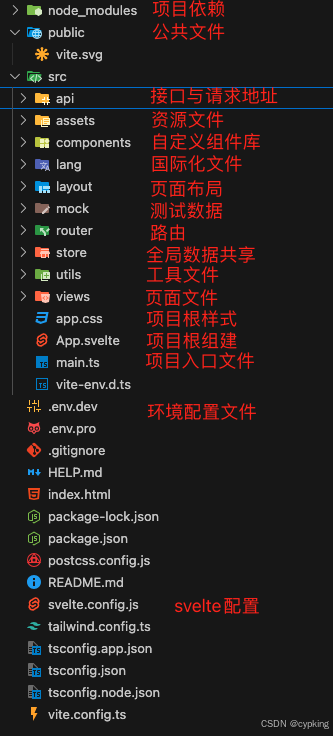
三、svelte路由配置
3.1 npm安裝
項目中安裝svelte-spa-router
npm install svelte-spa-router
3.2 定義router
- 每條路由都是一個普通的Svelte組件,包含標記、腳本、綁定等。任何Svelte組件都可以是路由。
- 路由定義只是一個JavaScript字典(對象),其中鍵是一個帶有路徑(包括參數等)的字符串,值是路由對象。
import Home from './routes/Home.svelte'
import Author from './routes/Author.svelte'
import Book from './routes/Book.svelte'
import NotFound from './routes/NotFound.svelte'const routes = {// Exact path'/': Home,// Using named parameters, with last being optional'/author/:first/:last?': Author,// Wildcard parameter'/book/*': Book,// Catch-all// This is optional, but if present it must be the last'*': NotFound,
}
3.2.1 動態導入組件
使用動態導入的優點是,如果您的打包器支持,您可以啟用代碼拆分并減小發送給用戶的捆綁包的大小。這已經用包括Rollup和Webpack在內的捆綁器進行了測試
- 要使用動態導入的組件,您需要利用包裝方法(根據路線包裝文檔,該方法可用于各種操作)。首先,導入wrap方法:
import {wrap} from 'svelte-spa-router/wrap'
- 然后,在路由定義中,使用wrap方法包裝路由,將一個函數傳遞給asyncComponent屬性,該函數將動態導入的組件返回給asyncComponent:
wrap({asyncComponent: () => import('./Foo.svelte')
})
案例:
// Import the wrap method
import {wrap} from 'svelte-spa-router/wrap'// Note that Author and Book are not imported here anymore, so they can be imported at runtime
import Home from './routes/Home.svelte'
import NotFound from './routes/NotFound.svelte'const routes = {'/': Home,// Wrapping the Author component'/author/:first/:last?': wrap({asyncComponent: () => import('./routes/Author.svelte')}),// Wrapping the Book component'/book/*': wrap({asyncComponent: () => import('./routes/Book.svelte')}),// Catch-all route last'*': NotFound,
}
3.2.2 在頁面之間導航
- 錨點導航
<a href="#/book/123">Thus Spoke Zarathustra</a>
- use:link導航(可以使用use:link操作,而不必在每個鏈接前鍵入#)
<script>
import {link} from 'svelte-spa-router'
</script>
<a href="/book/321" use:link>The Little Prince</a>
3.3 使用路由
在app.svelte中全局調用
import Router from 'svelte-spa-router'
然后,通過將組件放置在標記中,將路由器顯示在您想要的任何位置
<body><Router {routes}/>
</body>
四、svelte CSS預處理器
4.1 less的使用
4.1.1 npm安裝
安裝less與svelte-preprocess-less依賴
npm install --save-dev svelte-preprocess-less less
在vite.config.js進行配置
import { less } from 'svelte-preprocess-less'
export default defineConfig({plugins: [svelte({preprocess: {style: less(),},})],
})
4.2 Tailwind CSS的使用
通過npx安裝直接配置完 tailwindcss
npx sv add tailwindcss
五、svelte環境變量配置
?Vite中使用環境變量主要通過.env文件來配置,這些文件根據不同的環境(開發、測試、生產等)有不同的命名規則和使用方式。
5.1 環境變量命名規則
所有環境變量必須以VITE_為前綴
VITE_API_URL=https://api.example.com
VITE_APP_TITLE=My Vite App
5.2 .env文件的使用
1?. 通用環境變量?:在項目的根目錄下創建.env文件,用于定義所有環境通用的變量。
2?. 特定環境變量?:根據不同的環境需求,可以創建以下類型的.env文件:
.env.devt:僅在開發環境中使用。
.env.pro:僅在生產環境中使用。
.env.local:通用的本地配置文件,通常不提交到版本控制系統中。
.env.development.local:開發環境的本地配置文件。
.env.production.local:生產環境的本地配置文件?
5.3 在代碼中使用環境變量
console.log(import.meta.env.VITE_API_URL);5.4 配置運行與打包環境
"scripts": {"dev": "vite --mode dev",//運行dev環境"dev-pro": "vite --mode pro",//運行pro環境"build": "vite build","preview": "vite preview","check": "svelte-check --tsconfig ./tsconfig.app.json && tsc -p tsconfig.node.json"},
六、svelte國際化
svelte-i18n 是一個用于 Svelte 應用的國際化(i18n)庫,它可以幫助你輕松地管理和切換應用中的多語言內容。以下是如何在 Svelte 項目中使用 svelte-i18n 的基本步驟:
6.1 安裝 svelte-i18n
首先,確保你已經安裝了 svelte-i18n。根據你的 package.json 文件,它已經存在于 dependencies 中。
npm install svelte-i18n
6.2 初始化 svelte-i18n
在你的 Svelte 項目中,通常會在 src 目錄下創建一個 i18n.js 或 i18n.ts 文件來初始化 svelte-i18n。
// src/i18n.js
import { init, register, locale } from 'svelte-i18n';// 注冊默認語言
register('en', () => import('./locales/en.json'));
register('zh', () => import('./locales/zh.json'));// 初始化并設置默認語言
init({fallbackLocale: 'en',initialLocale: 'en',
});
6.3 創建語言文件
在 src/locales 目錄下創建語言文件,例如 en.json 和 zh.json。
// src/locales/en.json
{"welcome": "Welcome to Svelte App","greeting": "Hello, {name}!"
}
// src/locales/zh.json
{"welcome": "歡迎使用 Svelte 應用","greeting": "你好, {name}!"
}
6.4 在 Svelte 組件中使用 svelte-i18n
你可以在 Svelte 組件中使用 $t 函數來獲取翻譯內容。
<script>import { t } from 'svelte-i18n';
</script><h1>{$t('welcome')}</h1>
<p>{$t('greeting', { name: 'John' })}</p>
6.5 切換語言
你可以通過 locale.set 方法來動態切換語言。
<script>import { locale } from 'svelte-i18n';
</script><button on:click={() => locale.set('en')}>English</button>
<button on:click={() => locale.set('zh')}>中文</button>
6.6 在 App.svelte 中引入 i18n.js
- 確保在
App.svelte或你的主入口文件中引入i18n.js。
<script>import './i18n.js';
</script>
- 確保加載完i18n后在加載頁面
<script>import { locale } from "svelte-i18n";import Router from "@/router/Router.svelte";
</script>
{#if $locale}<Layout><Router /></Layout>
{/if}
6.7 運行項目
使用 npm run dev 運行你的項目,你應該能夠看到國際化內容并根據按鈕切換語言。
6.8 構建項目
當你準備好發布項目時,使用 npm run build 來構建項目。
npm run build
6.9 預覽項目
使用 npm run preview 來預覽構建后的項目。
npm run preview
6.10 檢查項目
使用 npm run check 來檢查 Svelte 和 TypeScript 的類型。
npm run check
通過以上步驟,你應該能夠在 Svelte 項目中成功使用 svelte-i18n 來實現國際化功能。
七、svelte接口請求
在 Svelte 項目中使用 axios 進行 HTTP 請求是非常常見的操作。以下是如何在 Svelte 項目中集成和使用 axios 的步驟:
7.1 安裝 axios
首先,確保你已經安裝了 axios。根據你的 package.json 文件,它已經存在于 dependencies 中。
npm install axios
7.2 創建 axios 實例
為了更好的管理和配置 axios,通常會在 src/utils 目錄下創建一個 api.ts 或 api.js 文件來創建 axios 實例。
// src/utils/api.ts
import axios from 'axios';const api = axios.create({baseURL: 'https://api.example.com', // 你的 API 基礎 URLtimeout: 10000, // 請求超時時間headers: {'Content-Type': 'application/json',},
});export default api;
7.3 在 Svelte 組件中使用 axios
你可以在 Svelte 組件中導入并使用 axios 實例來發送 HTTP 請求。
<script lang="ts">import api from '@/utils/api';import { onMount } from 'svelte';let data: any;onMount(async () => {try {const response = await api.get('/endpoint');data = response.data;} catch (error) {console.error('Error fetching data:', error);}});
</script>{#if data}<div><h1>{data.title}</h1><p>{data.description}</p></div>
{/if}
7.4 處理請求和響應攔截器
你可以在 axios 實例中添加請求和響應攔截器,以便在請求發送前或響應到達后進行一些處理。
// src/utils/api.ts
import axios from 'axios';const api = axios.create({baseURL: 'https://api.example.com',timeout: 10000,headers: {'Content-Type': 'application/json',},
});// 請求攔截器
api.interceptors.request.use((config) => {// 在請求發送之前做一些處理,例如添加 tokenconst token = localStorage.getItem('token');if (token) {config.headers.Authorization = `Bearer ${token}`;}return config;},(error) => {return Promise.reject(error);}
);// 響應攔截器
api.interceptors.response.use((response) => {// 對響應數據做一些處理return response;},(error) => {// 對響應錯誤做一些處理return Promise.reject(error);}
);export default api;
7.5 在 App.svelte 中使用 axios
你可以在 App.svelte 中使用 axios 來獲取數據或執行其他 HTTP 操作。
<script lang="ts">import api from '@/utils/api';import { onMount } from 'svelte';let userData: any;onMount(async () => {try {const response = await api.get('/user');userData = response.data;} catch (error) {console.error('Error fetching user data:', error);}});
</script>{#if userData}<div><h1>Welcome, {userData.name}!</h1><p>Email: {userData.email}</p></div>
{/if}
7.6 處理錯誤
在使用 axios 時,確保你處理了可能的錯誤,例如網絡錯誤或服務器錯誤。
<script lang="ts">import api from '@/utils/api';import { onMount } from 'svelte';let userData: any;let errorMessage: string | null = null;onMount(async () => {try {const response = await api.get('/user');userData = response.data;} catch (error) {errorMessage = 'Failed to fetch user data. Please try again later.';console.error('Error fetching user data:', error);}});
</script>{#if userData}<div><h1>Welcome, {userData.name}!</h1><p>Email: {userData.email}</p></div>
{:else if errorMessage}<p style="color: red;">{errorMessage}</p>
{/if}
通過以上步驟,你應該能夠在 Svelte 項目中成功使用 axios 來進行 HTTP 請求。
八、svelte組件庫
這里用的是melt-ui,訪問地址是:https://www.melt-ui.com/docs/introduction
一鍵配置
npx @melt-ui/cli@latest init
九、svelte阿里圖標庫
在 Svelte 項目中使用阿里圖標(如 iconfont)可以通過以下步驟實現:
9.1 獲取阿里圖標
- 訪問 iconfont 并登錄。
- 創建一個項目,將需要的圖標添加到項目中。
- 選擇
Font class或Symbol方式生成代碼。 - 點擊
下載至本地,解壓后得到圖標文件。
9.2 將圖標文件放入項目
將下載的圖標文件(如 iconfont.css 和字體文件)放入項目的 public 或 src/assets 目錄中。
例如:
public/iconfont/iconfont.cssiconfont.ttficonfont.wofficonfont.woff2
9.3 引入圖標文件
在 App.svelte 或 main.ts 中引入 iconfont.css 文件。
<script lang="ts">import "./app.css";import Layout from "@/layout/Layout.svelte";import Router from "@/router/Router.svelte";import { locale } from "svelte-i18n";import Toast from "./components/Toast.svelte";import { toast } from "@/utils/toastService";// 引入阿里圖標import '../public/iconfont/iconfont.css';
</script>
9.4 使用圖標
在 Svelte 組件中使用阿里圖標,直接通過 class 引用圖標類名。
<div><i class="iconfont icon-home"></i> <!-- icon-home 是圖標類名 --><i class="iconfont icon-user"></i> <!-- icon-user 是圖標類名 -->
</div>
9.5 動態切換圖標
如果需要動態切換圖標,可以將圖標類名綁定到變量。
<script lang="ts">let iconClass = 'icon-home';
</script><div><i class={`iconfont ${iconClass}`}></i><button on:click={() => iconClass = 'icon-user'}>切換圖標</button>
</div>
9.6 使用 Symbol 方式(可選)
如果選擇 Symbol 方式,需要引入 iconfont.js 文件,并使用 <svg> 標簽。
<script lang="ts">import '../public/iconfont/iconfont.js';
</script><svg class="icon" aria-hidden="true"><use xlink:href="#icon-home"></use> <!-- #icon-home 是圖標 ID -->
</svg>
9.7 樣式調整(可選)
如果需要調整圖標大小或顏色,可以通過 CSS 設置。
<style lang="less">.iconfont {font-size: 24px;color: #333;}
</style>
9.8 示例代碼
以下是一個完整的示例:
<script lang="ts">import "./app.css";import Layout from "@/layout/Layout.svelte";import Router from "@/router/Router.svelte";import { locale } from "svelte-i18n";import Toast from "./components/Toast.svelte";import { toast } from "@/utils/toastService";// 引入阿里圖標import '../public/iconfont/iconfont.css';let iconClass = 'icon-home';
</script>{#if $locale}<Layout><Router /></Layout>{#if $toast.visible}<Toast message={$toast.message} />{/if}
{/if}<div><i class={`iconfont ${iconClass}`}></i><button on:click={() => iconClass = 'icon-user'}>切換圖標</button>
</div><style lang="less">.iconfont {font-size: 24px;color: #333;}
</style>
通過以上步驟,你可以在 Svelte 項目中成功使用阿里圖標。如果需要更多定制化功能,可以參考 iconfont 官方文檔。
十、svelte輪播圖
這里用的是https://3.swiper.com.cn/
下載引入相關css與js即可
demo如下
<script>import { onMount } from 'svelte';import  '@/utils/swiper/swiper.min.js';import '@/utils/swiper/swiper.min.css';let swiperInstance;onMount(() => {// 初始化 SwiperswiperInstance = new Swiper('.swiper-container', {pagination: '.swiper-pagination',paginationClickable: true,autoplay:2500,loop:true});});</script><style>html, body {position: relative;height: 100%;}body {background: #eee;font-family: Helvetica Neue, Helvetica, Arial, sans-serif;font-size: 14px;color:#000;margin: 0;padding: 0;}.swiper-container {width: 100%;height: 350px;}.swiper-slide {text-align: center;font-size: 18px;background: #fff;/* Center slide text vertically */display: -webkit-box;display: -ms-flexbox;display: -webkit-flex;display: flex;-webkit-box-pack: center;-ms-flex-pack: center;-webkit-justify-content: center;justify-content: center;-webkit-box-align: center;-ms-flex-align: center;-webkit-align-items: center;align-items: center;}</style><!-- Swiper --><div class="swiper-container"><div class="swiper-wrapper"><div class="swiper-slide">Slide 1</div><div class="swiper-slide">Slide 2</div></div><!-- Add Pagination --><div class="swiper-pagination"></div>
</div>
十一、store數據共享
在 Svelte 中,store 是一個核心概念,用于管理應用的狀態。為了更好地組織代碼,可以將 store 封裝為模塊,包括 state、actions、getters 和 mutations,類似于 Vuex 或 Redux 的設計模式。以下是如何封裝 store 的示例:
1. 創建 store 模塊
在 src/store 目錄下創建一個模塊,例如 centerStore.ts,用于管理特定模塊的狀態和邏輯。
// src/store/centerStore.ts
import { writable, derived } from 'svelte/store';// State
const state = writable({userData: null,loading: false,error: null,
});// Actions
const actions = {async getUserData(params: { onlyMakeTheSame: boolean }) {try {state.update((s) => ({ ...s, loading: true, error: null }));// 模擬 API 調用const response = await fetch('/api/user', { method: 'GET' });const data = await response.json();state.update((s) => ({ ...s, userData: data, loading: false }));} catch (error) {state.update((s) => ({ ...s, error: error.message, loading: false }));}},
};// Getters
const getters = {userData: derived(state, ($state) => $state.userData),isLoading: derived(state, ($state) => $state.loading),error: derived(state, ($state) => $state.error),
};// Mutations (可選)
const mutations = {setUserData(userData: any) {state.update((s) => ({ ...s, userData }));},
};// 導出模塊
export const centerStore = {state,actions,getters,mutations,
};
2. 創建全局 store
在 src/store/index.ts 中整合所有模塊,創建一個全局 store。
// src/store/index.ts
import { centerStore } from './centerStore';export const store = {center: centerStore,
};
3. 在組件中使用 store
在 Svelte 組件中導入并使用 store。
<script lang="ts">import { store } from '@/store/index';import { onMount } from 'svelte';// 獲取 state 和 gettersconst { state, getters } = store.center;// 調用 actionfunction fetchData() {store.center.actions.getUserData({ onlyMakeTheSame: false });}onMount(() => {fetchData();});
</script>{#if $getters.isLoading}<p>Loading...</p>
{:else if $getters.error}<p style="color: red;">Error: {$getters.error}</p>
{:else if $getters.userData}<div><h1>User Data</h1><pre>{JSON.stringify($getters.userData, null, 2)}</pre></div>
{/if}<button on:click={fetchData}>Refresh Data</button>
4. 封裝 store 的優勢
- 模塊化:將狀態和邏輯按模塊劃分,便于維護和擴展。
- 復用性:
actions和getters可以在多個組件中復用。 - 可測試性:
actions和mutations可以單獨測試。 - 清晰性:
state、actions、getters和mutations分離,代碼結構更清晰。
5. 示例:about.svelte 中使用 store
根據你的 about.svelte 文件,可以這樣使用 store:
<script lang="ts">import { t, locale } from "svelte-i18n";import { toast } from '@/utils/toastService';import { store } from '@/store/index';function getData() {store.center.actions.getUserData({ onlyMakeTheSame: false });}
</script><h1>{$t("welcome")}</h1>
<p>{$t("about")}</p><button on:click={getData}>獲取接口數據</button>{#if $store.center.getters.isLoading}<p>Loading...</p>
{:else if $store.center.getters.error}<p style="color: red;">Error: {$store.center.getters.error}</p>
{:else if $store.center.getters.userData}<div><h1>User Data</h1><pre>{JSON.stringify($store.center.getters.userData, null, 2)}</pre></div>
{/if}
通過以上步驟,你可以在 Svelte 項目中封裝 store,并實現 state、actions、getters 和 mutations 的分離,使代碼更易于維護和擴展。
十二、擴展內容
這里由于使用的melt-ui沒有toast提示于是做了一個全局組建toas.svelte
- 組建創建
<script>import { fade } from "svelte/transition";export let message = "";export let duration = 3000; // 持續時間,單位毫秒let visible = false;const showToast = () => {visible = true;setTimeout(() => {visible = false;}, duration);};showToast(); // 顯示Toast
</script>{#if visible}<div class="toast" transition:fade>{message}</div>
{/if}<style>.toast {position: fixed;top: 300px;left: 50%;transform: translateX(-50%);padding: 10px 20px;background-color: #333;color: white;border-radius: 5px;z-index: 1000;}
</style>- toastService封裝
import { writable } from 'svelte/store';
function createToast() {const { subscribe, set, update } = writable({ message: '', visible: false });function show(message, duration = 3000) {set({ message, visible: true });setTimeout(() => {update(current => ({ ...current, visible: false }));}, duration);}return {subscribe,show, // 公開show方法供外部調用};
}export const toast = createToast(); // 創建并導出toast服務實例
- 全局調用app.svelte
<script lang="ts">import Toast from "./components/Toast.svelte";import { toast } from "@/utils/toastService";
</script>{#if $toast.visible}<!-- 使用$來訪問store的值 --><Toast message={$toast.message} /><!-- 將消息傳遞給Toast組件 -->{/if}
- 使用
import { toast } from '@/utils/toastService';toast.show('Hello, this is a toast!')
十三、框架git地址
https://gitee.com/cyp926/svelte-vite


條件運算符和條件表達式)


)

)


)
