LaTeX 中 algorithm 環境完整指南
在科研論文里,寫清楚算法步驟通常需要用到 偽代碼環境。最常見的選擇有兩個包:
algorithm2e—— 功能最強大,適合期刊/學位論文algorithmicx+algpseudocode—— 更靈活、可定制,常用于會議模板
1?? 常用包的選擇
-
algorithm2e
\usepackage[ruled,vlined]{algorithm2e}ruled:算法標題在上方,并有橫線vlined:每行后加豎線(折線效果),用來表示語句塊作用域linesnumbered:為每一行添加行號- 提供
\KwIn,\KwOut,\For,\If,\While等高階命令 - 自帶行號、自動縮進、美觀
-
algorithmicx + algpseudocode
\usepackage{algorithm} \usepackage{algpseudocode}algorithm負責浮動體,類似 figure/tablealgpseudocode提供命令,比如\State,\If,\For- 優點:高度可控,適合需要精細排版的場景
2?? 基本結構
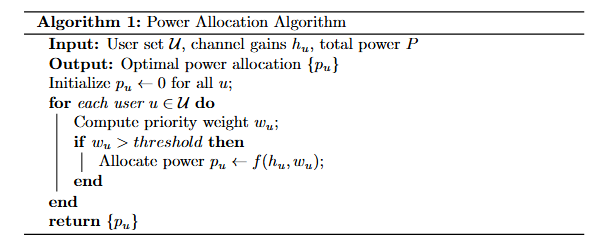
algorithm2e 示例
\begin{algorithm}[!t]\SetAlgoLined\caption{Power Allocation Algorithm}\KwIn{User set $\mathcal{U}$, channel gains $h_u$, total power $P$}\KwOut{Optimal power allocation $\{p_u\}$}Initialize $p_u \gets 0$ for all $u$\;\For{each user $u \in \mathcal{U}$}{Compute priority weight $w_u$\;\If{$w_u > \text{threshold}$}{Allocate power $p_u \gets f(h_u, w_u)$\;}}\Return $\{p_u\}$
\end{algorithm}
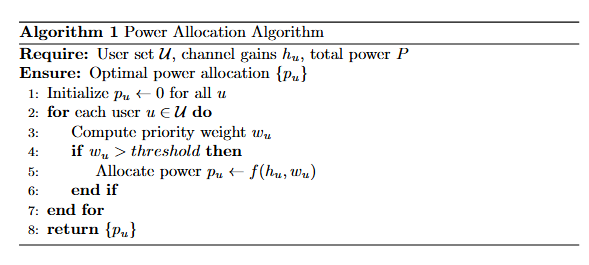
algorithmicx + algpseudocode 示例
\begin{algorithm}[!t]
\caption{Power Allocation Algorithm}
\begin{algorithmic}[1]
\Require User set $\mathcal{U}$, channel gains $h_u$, total power $P$
\Ensure Optimal power allocation $\{p_u\}$\State Initialize $p_u \gets 0$ for all $u$
\For{each user $u \in \mathcal{U}$}\State Compute priority weight $w_u$\If{$w_u > \text{threshold}$}\State Allocate power $p_u \gets f(h_u, w_u)$\EndIf
\EndFor
\State \Return $\{p_u\}$
\end{algorithmic}
\end{algorithm}
3?? 注意事項
🔹 (1) 包沖突問題
- 有些模板(如 IEEEtran)自帶
algorithm環境,可能會和algorithm2e沖突 - 解決方法:如果用
algorithm2e,建議\usepackage[linesnumbered,ruled,vlined]{algorithm2e}并避免同時加載algorithmicx
🔹 (2) 算法位置控制
\begin{algorithm}[!t]—— 強制浮動到頁面頂部[!h]—— 盡量放在當前位置[!b]—— 底部
🔹 (3) 行號 & 標題規范
- 行號:
algorithm2e用\SetAlgoNlRelativeSize{-1}調整大小 - 標題:最好簡潔,避免超過一行
- 如果論文模板要求“Algorithm 1: xxx”,需檢查 期刊模板 是否自帶樣式
🔹 (4) 中英文混排
- 建議輸入輸出統一用
\KwIn、\KwOut,保持一致 - 中文論文里標題可寫中文,但正文盡量保持英文變量與符號
🔹 (5) 長算法分頁
algorithm2e自帶分頁支持algorithmicx需要加\usepackage{algcompatible}來避免分頁問題
🔹 (6) 折線(豎線)控制
- 在
algorithm2e里,折線由vlined選項決定 - 如果不想要折線,有兩種方法:
全局關閉:在導言區去掉 vlined
\usepackage[ruled]{algorithm2e}
局部關閉:在某個算法內部用命令
\SetVline{false}
需要恢復時再寫
\SetVline{true}
👉 這樣你可以靈活決定:有的算法直觀用折線表示作用域,有的算法則更簡潔無豎線。
4?? 小技巧
-
偽代碼中寫注釋
\tcp{This is a comment in algorithm2e} % or \Comment{This is a comment in algpseudocode} -
多行輸入/輸出
\KwIn{$\mathcal{U}$: set of users, $P$: total power} \KwOut{Optimal allocation $\{p_u\}$} -
強制換行
在algorithm2e里用\;


)


)


上部署Oracle 11g、19C RAC詳細圖文教程)


)
![6-7 TIM編碼器接口 [江科協STM32]](http://pic.xiahunao.cn/6-7 TIM編碼器接口 [江科協STM32])