數據庫實現
設計簽到功能對應的數據庫表
 CREATE TABLE `sign_record` (`id` bigint NOT NULL AUTO_INCREMENT COMMENT '主鍵',`user_id` bigint NOT NULL COMMENT '用戶id',`year` year NOT NULL COMMENT '簽到年份',`month` tinyint NOT NULL COMMENT '簽到月份',`date` date NOT NULL COMMENT '簽到日期',`is_backup` bit(1) NOT NULL COMMENT '是否補簽',PRIMARY KEY (`id`),
) ENGINE=InnoDB DEFAULT CHARSET=utf8mb4 COMMENT='簽到記錄表';
這張表中的一條記錄是一個用戶一次的簽到記錄。假如一個用戶1年簽到100次,而網站有100萬用戶,就會產生1億條記錄。隨著用戶量增多、時間的推移,這張表中的數據只會越來越多,占用的空間也會越來越大。
redis bitmap 實現
一個用戶簽到的情況無非就兩種,要么簽了,要么沒。 可以用 0 或者1如果我們按月來統計用戶簽到信息,簽到記錄為1,未簽到則記錄為0,就可以用一個長度為31位的二級制數來表示一個用戶一個月的簽到情況。最終效果如下

java代碼
引入依賴
<?xml version="1.0" encoding="UTF-8"?>
<project xmlns="http://maven.apache.org/POM/4.0.0" xmlns:xsi="http://www.w3.org/2001/XMLSchema-instance"xsi:schemaLocation="http://maven.apache.org/POM/4.0.0 https://maven.apache.org/xsd/maven-4.0.0.xsd"><modelVersion>4.0.0</modelVersion><groupId>com.orchids</groupId><artifactId>signinbybitmap</artifactId><version>0.0.1-SNAPSHOT</version><name>signinbybitmap</name><description>signinbybitmap</description><properties><java.version>1.8</java.version><project.build.sourceEncoding>UTF-8</project.build.sourceEncoding><project.reporting.outputEncoding>UTF-8</project.reporting.outputEncoding><spring-boot.version>2.6.13</spring-boot.version></properties><dependencies><dependency><groupId>org.springframework.boot</groupId><artifactId>spring-boot-starter-web</artifactId></dependency><dependency><groupId>org.projectlombok</groupId><artifactId>lombok</artifactId><optional>true</optional></dependency><dependency><groupId>org.springframework.boot</groupId><artifactId>spring-boot-starter-test</artifactId><scope>test</scope></dependency><dependency><groupId>com.github.xiaoymin</groupId><artifactId>knife4j-spring-boot-starter</artifactId><version>3.0.3</version></dependency><dependency><groupId>org.springframework.boot</groupId><artifactId>spring-boot-starter-data-redis</artifactId></dependency></dependencies><dependencyManagement><dependencies><dependency><groupId>org.springframework.boot</groupId><artifactId>spring-boot-dependencies</artifactId><version>${spring-boot.version}</version><type>pom</type><scope>import</scope></dependency></dependencies></dependencyManagement><build><plugins><plugin><groupId>org.apache.maven.plugins</groupId><artifactId>maven-compiler-plugin</artifactId><version>3.8.1</version><configuration><source>1.8</source><target>1.8</target><encoding>UTF-8</encoding></configuration></plugin><plugin><groupId>org.springframework.boot</groupId><artifactId>spring-boot-maven-plugin</artifactId><version>${spring-boot.version}</version><configuration><mainClass>com.orchids.signinbybitmap.SignByBitmapApplication</mainClass><skip>true</skip></configuration><executions><execution><id>repackage</id><goals><goal>repackage</goal></goals></execution></executions></plugin></plugins></build></project>
配置文件
# 應用服務 WEB 訪問端口
server:port: 8080spring:redis:host: localhostport: 6379password: 6379mvc:pathmatch:matching-strategy: ant_path_matcher
knife4j配置類
package com.orchids.signinbybitmap.web.config;import org.springframework.context.annotation.Bean;
import org.springframework.context.annotation.Configuration;
import springfox.documentation.builders.ApiInfoBuilder;
import springfox.documentation.builders.PathSelectors;
import springfox.documentation.builders.RequestHandlerSelectors;
import springfox.documentation.service.ApiInfo;
import springfox.documentation.service.Contact;
import springfox.documentation.spi.DocumentationType;
import springfox.documentation.spring.web.plugins.Docket;
//import springfox.documentation.swagger2.annotations.EnableSwagger2;/*** @ Author qwh* @ Date 2024/7/5 13:08*/
@Configuration
//@EnableSwagger2
public class knife4jConfiguration {@Beanpublic Docket webApiConfig(){// 創建Docket實例Docket webApi = new Docket(DocumentationType.SWAGGER_2).groupName("StudentApi").apiInfo(webApiInfo()).select()// 選擇需要文檔化的API,只顯示指定包下的頁面.apis(RequestHandlerSelectors.basePackage("com.orchids.signinbybitmap"))// 指定路徑匹配規則,只對/student開頭的路徑進行文檔化.paths(PathSelectors.regex("/User/.*")).build();return webApi;}/*** 構建API信息* 本函數用于創建并返回一個ApiInfo對象,該對象包含了API文檔的標題、描述、版本以及聯系方式等信息。* @return 返回構建好的ApiInfo對象*/private ApiInfo webApiInfo(){// 使用ApiInfoBuilder構建API信息return new ApiInfoBuilder().title("Student message API文檔") // 設置文檔標題.description("本文檔描述了Swagger2測試接口定義") // 設置文檔描述.version("1.0") // 設置文檔版本號.contact(new Contact("nullpointer", "http://blog.nullpointer.love", "nullpointer2024@gmail.com")) // 設置聯系人信息.build(); // 構建并返回ApiInfo對象}
}
controller
package com.orchids.signinbybitmap.web.controller;import com.orchids.signinbybitmap.web.domain.result.Result;
import com.orchids.signinbybitmap.web.domain.vo.SignResultVO;
import com.orchids.signinbybitmap.web.service.SignService;
import io.swagger.annotations.Api;
import io.swagger.annotations.ApiOperation;
import lombok.RequiredArgsConstructor;
import org.springframework.web.bind.annotation.*;/*** @ Author qwh* @ Date 2024/7/5 13:01*/
@Api(tags = "簽到相關接口")
@RestController
@RequestMapping("/User")
@RequiredArgsConstructor
public class SignController {private final SignService signService;@ApiOperation("簽到")@GetMapping("Sign")public Result<SignResultVO> AddSignRecords() {return signService.AddSignRecords();}
}
service
package com.orchids.signinbybitmap.web.service;import com.orchids.signinbybitmap.web.domain.result.Result;
import com.orchids.signinbybitmap.web.domain.vo.SignResultVO;/*** @ Author qwh* @ Date 2024/7/5 13:35*/
public interface SignService {Result<SignResultVO> AddSignRecords();
}
可以擴展其他功能
package com.orchids.signinbybitmap.web.service.impl;import com.orchids.signinbybitmap.web.domain.result.Result;
import com.orchids.signinbybitmap.web.domain.vo.SignResultVO;
import com.orchids.signinbybitmap.web.exception.SignException;
import com.orchids.signinbybitmap.web.service.SignService;
import lombok.RequiredArgsConstructor;
import lombok.extern.slf4j.Slf4j;
import org.springframework.data.redis.connection.BitFieldSubCommands;
import org.springframework.data.redis.core.StringRedisTemplate;
import org.springframework.stereotype.Service;import java.time.LocalDateTime;
import java.time.format.DateTimeFormatter;
import java.util.LinkedList;
import java.util.List;/*** @ Author qwh* @ Date 2024/7/5 13:35*/
@Slf4j
@Service
@RequiredArgsConstructor
public class SignServiceImpl implements SignService {private final String SIGN_UID= "sign:uid:";private final StringRedisTemplate redisTemplate;@Overridepublic Result<SignResultVO> AddSignRecords() {SignResultVO vo = new SignResultVO();//獲取簽到用戶Long userId = 1388888L;//獲取簽到日期LocalDateTime now = LocalDateTime.now();String format = now.format(DateTimeFormatter.ofPattern(":yyyy-MM-dd"));//設置redisKey   sign:uid:1388888:2024-07-05 5 1String key = SIGN_UID + userId.toString() + format;//計算簽到偏移量int offset = now.getDayOfMonth() - 1;//添加簽到記錄到redisBoolean sign = redisTemplate.opsForValue().setBit(key, offset, true);if (sign){throw new SignException("親!您今天已經登錄過喲 (?′?`?)",520);}//計算連續簽到天數int day = now.getDayOfMonth();int continueDays = countSignDays(key,day);int rewardPoints = 0;switch (continueDays){case 2:rewardPoints = 10;break;case 4:rewardPoints=20;break;case 6:rewardPoints = 40;break;}//獲取簽到詳情信息List<Integer> signDayRecord = SignRecords(userId,key,day);vo.setUserId(userId.intValue());vo.setSignDays(continueDays);vo.setRewardPoints(rewardPoints);vo.setSignRecords(signDayRecord);return Result.ok(vo);}/*** 獲取連續簽到天數* @param key* @param days* @return*/private int countSignDays(String key, int days) {//從redis讀取簽到記錄List<Long> nums = redisTemplate.opsForValue().bitField(key, BitFieldSubCommands.create().get(BitFieldSubCommands.BitFieldType.unsigned(days)).valueAt(0));//計算簽到次數int num = nums.get(0).intValue();//num與1進行與計算得到二進制的末尾 當末尾為1 說明簽到 為0 說明沒有簽到int result = 0;while ((num & 1) == 1) {result++;num = num >>>1;}//返回簽到結果return result;}/*** 獲取簽到詳情* @param userId* @param key* @param day* @return*/private List<Integer> SignRecords(Long userId, String key, int day) {//獲取從redis中獲取登錄信息List<Long> sign = redisTemplate.opsForValue().bitField(key, BitFieldSubCommands.create().get(BitFieldSubCommands.BitFieldType.unsigned(day)).valueAt(0));int num = sign.get(0).intValue();LinkedList<Integer> result = new LinkedList<>();while (day > 0) {result.addFirst(num & 1);num = num >>> 1;day--;}return result;}
}
其他類
package com.orchids.signinbybitmap.web.domain.result;import lombok.Data;/*** @ Author qwh* @ Date 2024/7/5 16:52*/
@Data
public class Result<T> {//返回碼private Integer code;//返回消息private String message;//返回數據private T data;public Result() {}private static <T> Result<T> build(T data) {Result<T> result = new Result<>();if (data != null)result.setData(data);return result;}public static <T> Result<T> build(T body, ResultCode resultCode) {Result<T> result = build(body);result.setCode(resultCode.getCode());result.setMessage(resultCode.getMessage());return result;}public static <T> Result<T> ok(T data) {return build(data, ResultCode.SUCCESS);}public static <T> Result<T> ok() {return Result.ok(null);}public static <T> Result<T> fail(Integer code, String message) {Result<T> result = build(null);result.setCode(code);result.setMessage(message);return result;}public static <T> Result<T> fail() {return build(null, ResultCode.FAIL);}
}
package com.orchids.signinbybitmap.web.domain.result;import lombok.Getter;/*** @ Author qwh* @ Date 2024/7/5 16:54*/
@Getter
public enum ResultCode {SUCCESS(200, "成功"),FAIL(201, "失敗"),PARAM_ERROR(202, "參數不正確"),SERVICE_ERROR(203, "服務異常"),DATA_ERROR(204, "數據異常"),ILLEGAL_REQUEST(205, "非法請求"),REPEAT_SUBMIT(206, "重復提交"),DELETE_ERROR(207, "請先刪除子集"),ADMIN_ACCOUNT_EXIST_ERROR(301, "賬號已存在"),ADMIN_CAPTCHA_CODE_ERROR(302, "驗證碼錯誤"),ADMIN_CAPTCHA_CODE_EXPIRED(303, "驗證碼已過期"),ADMIN_CAPTCHA_CODE_NOT_FOUND(304, "未輸入驗證碼"),ADMIN_ACCOUNT_NOT_EXIST(330,"用戶不存在"),ADMIN_LOGIN_AUTH(305, "未登陸"),ADMIN_ACCOUNT_NOT_EXIST_ERROR(306, "賬號不存在"),ADMIN_ACCOUNT_ERROR(307, "用戶名或密碼錯誤"),ADMIN_ACCOUNT_DISABLED_ERROR(308, "該用戶已被禁用"),ADMIN_ACCESS_FORBIDDEN(309, "無訪問權限"),APP_LOGIN_AUTH(501, "未登陸"),APP_LOGIN_PHONE_EMPTY(502, "手機號碼為空"),APP_LOGIN_CODE_EMPTY(503, "驗證碼為空"),APP_SEND_SMS_TOO_OFTEN(504, "驗證法發送過于頻繁"),APP_LOGIN_CODE_EXPIRED(505, "驗證碼已過期"),APP_LOGIN_CODE_ERROR(506, "驗證碼錯誤"),APP_ACCOUNT_DISABLED_ERROR(507, "該用戶已被禁用"),TOKEN_EXPIRED(601, "token過期"),TOKEN_INVALID(602, "token非法");private final Integer code;private final String message;ResultCode(Integer code, String message) {this.code = code;this.message = message;}
}
package com.orchids.signinbybitmap.web.domain.vo;import com.fasterxml.jackson.annotation.JsonIgnore;
import io.swagger.annotations.ApiModel;
import io.swagger.annotations.ApiModelProperty;
import io.swagger.models.auth.In;
import lombok.Data;import java.util.List;/*** @ Author qwh* @ Date 2024/7/5 13:36*/
@Data
@ApiModel(description = "簽到結果")
public class SignResultVO {@ApiModelProperty("簽到人")private Integer UserId;@ApiModelProperty("簽到得分")private Integer signPoints = 1;@ApiModelProperty("連續簽到天數")private Integer signDays;@ApiModelProperty("連續簽到獎勵積分,連續簽到超過7天以上才有獎勵")private Integer rewardPoints;@ApiModelProperty("簽到詳細信息")private List<Integer> signRecords;}
package com.orchids.signinbybitmap.web.exception;import com.orchids.signinbybitmap.web.domain.result.Result;
import org.springframework.web.bind.annotation.ControllerAdvice;
import org.springframework.web.bind.annotation.ExceptionHandler;
import org.springframework.web.bind.annotation.ResponseBody;/*** @ Author qwh* @ Date 2024/7/5 16:51*/
@ControllerAdvice
public class GlobalExceptionHandler {@ExceptionHandler(Exception.class)@ResponseBodypublic Result error(Exception e){e.printStackTrace();return Result.fail();}@ExceptionHandler(SignException.class)@ResponseBodypublic Result error(SignException e){e.printStackTrace();return Result.fail(e.getCode(), e.getMessage());}
}package com.orchids.signinbybitmap.web.exception;import lombok.Data;/*** @ Author qwh* @ Date 2024/7/5 16:47*/
@Data
public class SignException extends RuntimeException{//異常狀態碼private Integer code;/*** 通過狀態碼和錯誤消息創建異常對象* @param message* @param code*/public SignException(String message, Integer code) {super(message);this.code = code;}@Overridepublic String toString() {return "SignException{" +"code=" + code +", message=" + this.getMessage() +'}';}
}package com.orchids.signinbybitmap;import org.springframework.boot.SpringApplication;
import org.springframework.boot.autoconfigure.SpringBootApplication;@SpringBootApplication
public class SignByBitmapApplication {public static void main(String[] args) {SpringApplication.run(SignByBitmapApplication.class, args);}}測試結果
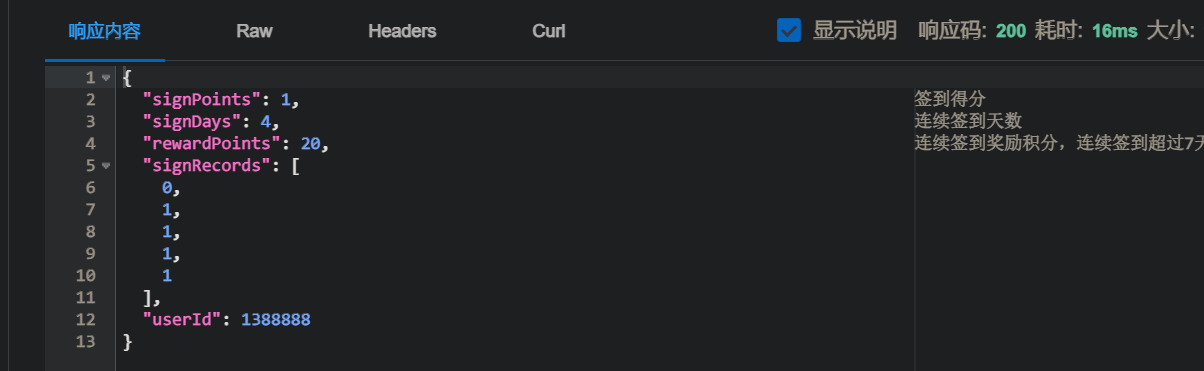
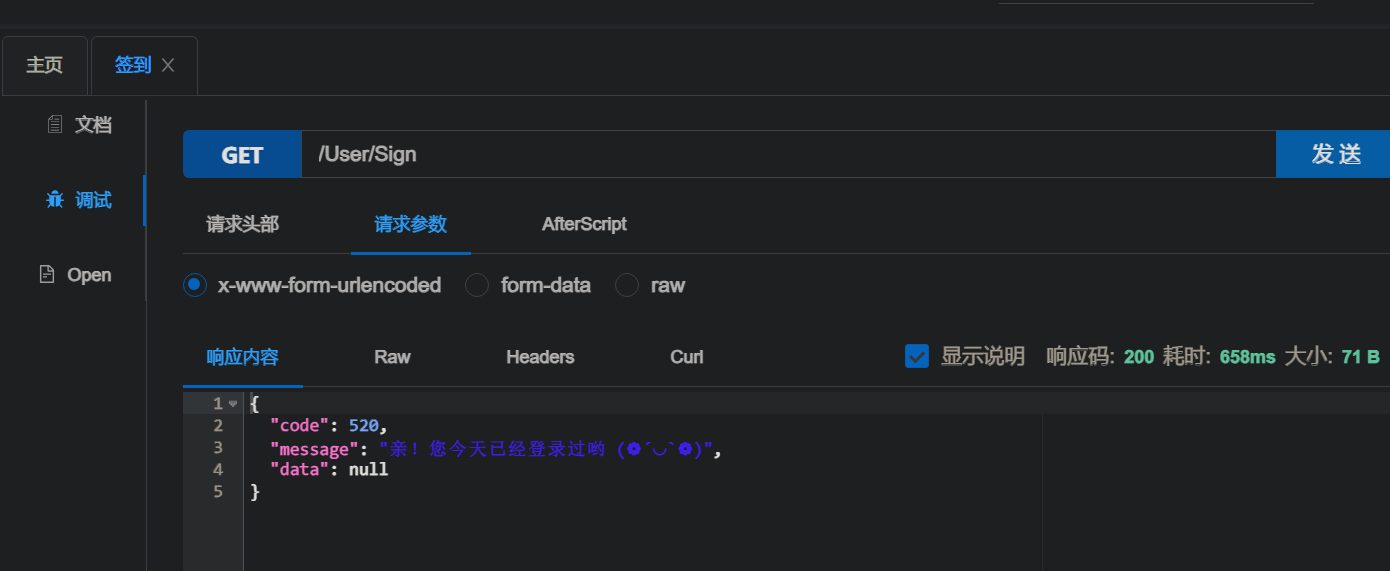


)


—網絡加固—ufw+防DNS污染+ARP綁定)


